
Cheap Travel Data, Easy Setup & No Roaming Bill Shock! ~ Is MobiMatter Worth It?
GENERAL MOBIMATTER INFO
≈📱 SERVICE: MobiMatter Travel eSIM
🌍 TYPE: Online marketplace for prepaid travel eSIMs
✈️ BEST FOR: Mobile data while travelling overseas
🛒 HOW TO BUY: Choose a destination, compare plans and purchase online
📲 INSTALLATION: Digital eSIM using supplied instructions or QR code
📶 NETWORK: Depends on the eSIM package and local provider
💳 PRICING: Varies by destination, data allowance and validity
⏱️ SETUP: My installations generally took only a few minutes
📞 CALLS & SMS: Check each package; many plans are data-only
⚠️ IMPORTANT: Check compatibility, coverage, activation and refund conditions
⭐ MY VERDICT: Easy to use and reliable throughout my personal travels
🌐 WEBSITE:mobimatter.com
🛠️ SUPPORT:MobiMatter troubleshooting
I have used these guys for many years now and without a glitch! I love them for their ease of use and price
Check their prices out here –> Competitive Travel eSIMS – easy click and choose the country and quick simple process from there
So there are SOOO many different eSIMs you can use these days but because of a recommendation from a friend of mine, I purchased off the 3rd party site “Mobimatter” who sell the products of many different providers, some I have heard of some I havent, and so this is my experience…
WHAT IS MOBIMATTER?
Ok, so MobiMatter isn’t a traditional mobile phone company
It’s an online marketplace where you can compare and purchase travel eSIM packages offered by different providers
An eSIM is a digital SIM that you install on a compatible phone, meaning there’s no need to hunt around for a little plastic SIM card when you arrive at your destination.
Instead, you purchase a data package, follow the installation instructions and connect to a supported mobile network.
Depending on the package, you can choose plans covering individual countries or multiple destinations.
And if you’re anything like me, you’ll appreciate not having to spend your first hour in a new country searching for a phone shop! who wants to do that anymore?!
*** PLEASE NOTE ***
A few people have commented on this post stating that the eSIM did not work for CANADA (due to no network coverage) and mobimatter not refunding them – the customer support mentioned that the customer MUST know if the eSIM covers the area before purchase so please double check to see where the eSIM will work for your particular travels before purchase
🇬🇪 GEORGIA 2026 ~ A 1-DAY TRIP FOR AU$5.50!
My most recent experience was in Sep 2026, when I needed mobile data for a quick day trip from Armenia into Georgia.
I chose a 1GB eSIM for AU$5.50
Because I wanted to test it out if it would work or stuff up lol I decided to install it the day before
Installation went smoothly!
Then, once I crossed the border into Georgia, I switched the eSIM over and bang! Internet working, no problems and another successful trip!
🇪🇺 EUROPE 2026 ~ 3 ESIMS OVER TEN WEEKS!
June and July 2026, when I spent around ten weeks travelling across Europe.
Over the entire trip, I used 3 different MobiMatter eSIMs
And once again? All worked perfectly for me!
Easy to organise, easy to use and one less thing to worry about while moving between countries
By this stage, MobiMatter had become a regular part of my travel planning and very affordable
🇦🇱 ALBANIA 2025 ~ CONNECTED IN 2 MINS!
Albania in May 2025.
This time, I purchased an eSIM for approximately AU$16.
After arriving at Tirana Airport, I used the airport Wi-Fi to complete the setup.
And honestly, it took around 2 mins!
The eSIM connected to Vodafone Albania, and everything worked perfectly during my experience.
Another little travel tech victory!
🇧🇬 BULGARIA 2025 ~ ANOTHER EASY EXPERIENCE!
In April 2025, I purchased another MobiMatter eSIM for Bulgaria.
The setup was straightforward.
As soon as I stepped off the plane, I had the eSIM working and was ready to go!
No issues, no fuss and a good price
Seriously so easy
WEBSITE LINK: Purchase your eSIM here
THE PROCESS
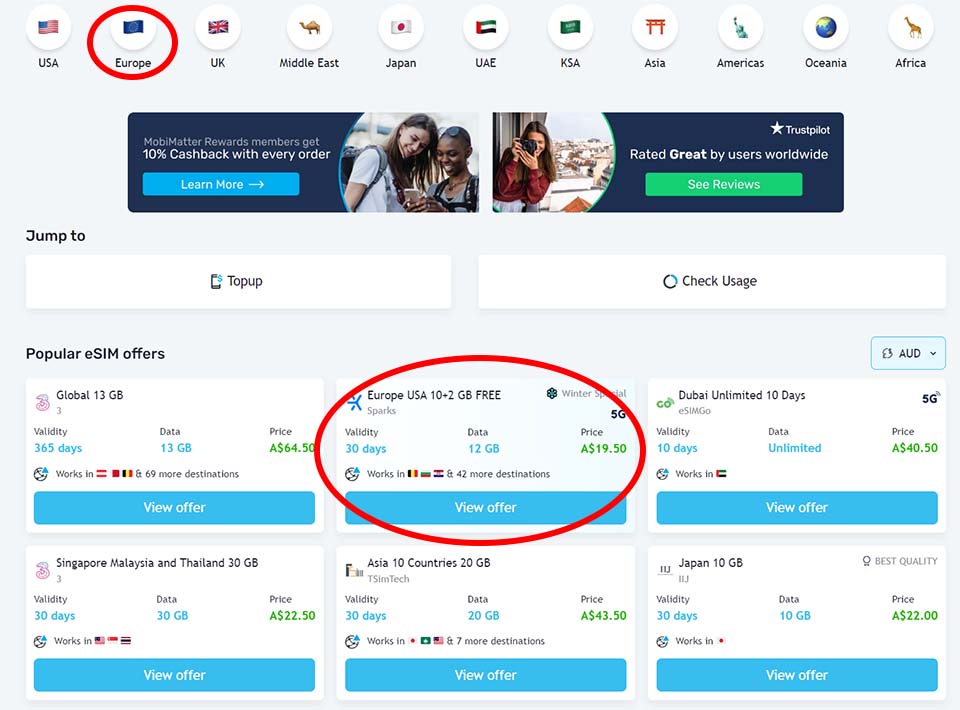
Go onto their website and seaching via their options for which country you are needing it for
BUY –> via their website
You have to have an idea roughly how any GBs you need when you travel, will you be listening to music or watching youtube? then you will need more GBs but if just to check out maps or keep in touch with people you will need a lower amount
Are you just using google maps or whatsapp to message your hotel or are you streaming on youtube or watching movies?
e.g. I recently went to Georgia for a daytrip and I only use google maps and my journal and map tracking apps as well as updating my blog on the go, I used a bit less than 1GB for the whole day
📲 INSTALLING THE ESIM ~ EVEN I COULD DO IT!
Soooo simple! literally took me 1 minute to activate the SIM when I was at the airport on my way overseas – you can then activate it and turn it on when you land at your destination
*Check instruction email when you should install the eSIM as some activate when you install and some activate on first use – you need good WIFI also
Recommended installing it a day or two before traveling to your destination.
Prerequisites:
- eSIM capable phone
- eSIM QR code (received by email or through the MobiMatter app/web)
- Good WiFi connection, preferably not a satellite connection (found on ships or airplanes) or free WiFis (like in airports or cafes) , as these might not work.
Steps:
- Go to Settings > Cellular / Mobile Data > Add an eSIM / Add Cellular Plan.
See my latest blog below for detailed instructions:
And basically its set up on your phone!
ACTIVATE:
Once you are ready to activate, toggle over the ON switch
then go into the eSIM and toggled the “data roaming” and its alll set up and I had data on the plane when I landed – super easy!
TIPS:
- Phone compatibility: Make sure your phone supports eSIMs and isn’t network-locked.
- Destination coverage: Check the actual countries and mobile networks included.
- Data allowance: Choose enough GB for how you plan to use your phone.
- Validity period: Check when the countdown begins.
- Installation instructions: Follow the instructions for your particular package.
- Wi-Fi: Have a reliable internet connection available when installing.
- Data roaming: Follow the provider’s instructions, as some travel eSIMs require it to be enabled.
- Calls and texts: Check whether the plan is data-only or includes a phone number.
- Refund policy: Read the conditions before paying.
MAR 2024


same !!
i bought mobimatter sim with 10 Gb plan for US , although there was no coverage and when i am asking for a refund as i didn’t receive any service for payment .
they are switching me over support ninjas rather then refund
LikeLike
Hi,
I’ve downloaded my eSIM from Mobi and it shows up under my SIM manager now.
Leaving for Europe in a few days.
What do I have to do to ensure this is activated on that network when I land in Europe?
Thanks for your help!
LikeLike
Hi there!
Please head over to their website mobimatter.com to check next steps they also would have emailed you
I wrote this review early in the year im not sure if things have changed or not?
Cheers!
LikeLike
They also have a support team to answer any questions:
https://mobimatter.com/troubleshoot
LikeLike
Avoid MobiMatter if you can: charge refund fee on its non working eSim.
I live in US, traveled to Quebec, Canada, last week. Bought Mobimatter esim for Canada. But the eSim did not work – no network coverage.
Tech support says I/Customer must know its eSim covers the area before purchase! So Ridiculous!
LikeLiked by 1 person
Hi Ki N Tran oh no! thats annoying, def a different experience from mine! 😦 sorry to hear that – thanks for your feedback! Im gonna add a little note at the end of the blog to mention to know exactly which area to purchase for
LikeLike
you didn’t mention mobimatter will take buyer money for its non working eSim – processing fee of refund of non working esim in canada.
LikeLiked by 1 person
Hi Vuot Bien, thanks for your comment and for your expeirence, another person just commented on the canada sim as well saying they were not given a refund as the esim didnt work for canada, mine was purchase for spain and I didnt have any issues – but I will add a little note to mention this – thanks again!
LikeLike